Showing posts with label lights. Show all posts

Wednesday, December 4, 2013

Life is kind of a living hell right now...

So I've been on this crazy long hiatus from you all because of life and all that jazz. I want to update you that I am still alive I have just been going through some crazy stuff, I have lost a friend (not dead just not really friends anymore), had a ton of stuff stolen from my car (which included my external hard drive so most of my pictures are all gone) and most recently I had a flat tire which hey isn't all bad but one on top of another on top of another is all fun right?

So I am not here to bore you on the woefulness that is my life but I as I make my way through all of this am thinking of starting up a separate blog about how my life could be a c list movie. I do plan on updating as soon as I have more free time but I know for sure there will be an update immediately following new years and hopefully one just before.

The one just before new years will be about how to shoot fireworks, all of those pictures should have been posted on my facebook so I should be able to go back and get those for that post, if not then I am a bit SOL because it really isn't firework season so lets hope I have them on my facebook :/

The one after new years will be of my trip to New York! I am super lucky to have this chance to go up to New York for new years, I have an amazing friend who is letting stay at his place so I don't have to pay for a hotel. I will be up there a week so I expect to have a couple different blog posts separating all of my pictures.

I am now in the midst of finals and getting crap done for my stupid art class and hopefully I will be able to have a post up in about two weeks(hopefully sooner if my life lets me do what I want) with a couple pictures I took over the Thanksgiving Holiday.

Now I don't want to just throw a bunch of words at you and not give you any pictures so here are some pics I have either previously posted the shoot and didn't share or I just hadnt had a chance to share it just yet.

 This picture was from my Night Time Photography blog post. This was a little pencil pouch I used to carry arround so we have a bit of fun up on the bridge.
 This shot is from the Photoshoot with off camera lighting blog post. I have a TON of pictures from this shoot that were just down right amazing, most of which are posted on my facebook page if you would like to check them out.
 This one is an extra from the Better then spoiled milk blog post. Yet again I have a ton of these but I havent gotten around to editing most of them! Hopefully there will be more of these up on my facebook page in the future.

This picture or rather composite is from a photoshoot I did almost a year ago. This is one of my very good friends and we were doing promo pics for the cosplay group she runs and I created this little beauty for her. 


Wednesday, May 29, 2013

Greenscreen? I think not! Its just magic...

So this past weekend I was up at Anime Odyssey in San Antonio and I had a photography booth set up where they could choose their own background. Now I did not use a green screen because one it is too much hassle and two it takes more lights than I personally have to light it correctly, and three spillage, where the green reflects up on the subject. So instead of greenscreen I used white and photoshop.

The biggest challenge I faced was just the fact that I wasn't able to steam my backdrop so there were creases in it but other than that it was pretty easy to pull them out of  the image.

The first step was obviously setting up my lighting, I used my cowboy studio remote flash system, and umbrella setup from Polaroid which I cant remember off the top of my head how much I paid but it wasn't much and it worked quite well. My flashes were set on manual at 1/8 power, my camera was set on shutter 1/250, f-stop was around 13 and my ISO was at 250. The lights were on either side of me a little higher than my head. Also the umbrellas are actually a key part of the setup it is near impossible to set up without the umbrellas or possibly a soft box if you are shooting with speed lights like I was. I went for a more even lighting for each image because it would make it easier to make them work in the backgrounds because I could manipulate the lighting in phoptoshop.
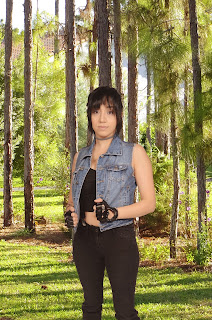


Next was the photoshop work itself, I let them pose themselves because I am not an expert on each character that they were dressed in so I didn't want to pose them in the wrong pose :/ so I took 3 poses and exported them straight to my computer as I was shooting so they could see the picture and make sure they weren't making a derpy face.

So once I finished with them I got to work in photoshop. What I use is the quick selection tool in photoshop and select them making sure anything with white is not in the selection. Next I go into refine edge witch is in the upper part of the screen usually about center. Once in there I will usually change the view mode to On Black so I can see if there is a white halo around them and usually there is. Next I check the smart radius option and change the radius to around 2.1, next I change the smoothness this mostly depends on if your subject has more curves or more harsh edges but I usually don't go over 15, next is the feathering that I dont go over 3 because it makes the edges too soft, contrast is usually around 6, and I shift my edge to around -7 this usually gets rid of the white halo, you can shift it in further if you need this is based on what you think looks good but usually -7 is where I put it.
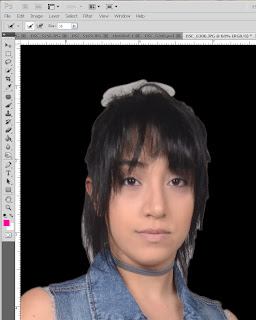


The next part is a bit more complicated because sometimes it works for me and sometimes it doesn't but you will click the little brush on in the screen so that when you mouse over the image it have a circle with a + in it. You will use this to paint the edges like hair and such. When you click and drag like you are painting it will start to look like this then once you let go it will think and it will add in the hair and take out the white.

Once you are done doing the edges I recommend outputting it to a new layer with a layer mask because with the layer mask you will be able to add anything that you might have accidentally missed.


Once you finish and hit OK it will look like this:

From here you make make any other edits by using the layer mask which is the black and white image that is right next to the preview of the image that you are on in the layer mask. To get to this you just click on the black and white part and you are now working in the layer mask. With this you will use your paint brush and white will add to it and black will take away so if you accidentally missed selecting a part of the shirt or something then you just add it here. Once you are satisfied then you can drop in a background.
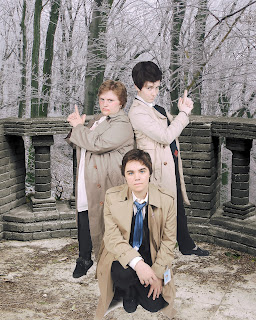


 Once you ad a background you are going to want to add a layer of a filter so that your subject and the background are the same hue so if its outside you will want the subject to match the warmth of the image or if its inside you will want it to match the lightness or darkness of the background image. I have a couple actions on my computer that I used to make this possible and easier. This part it the hardest to make it seem like it is part of the background, if you already know what the background is going to be the lighting can help but since everyone chose the background they wanted it would vary so it was easier for me to shoot it with even lighting and fix it up in photoshop. All together it took about 10-15 minutes per image to edit them.

Hope you enjoyed this little tutorial if you have any questions feel free to ask me here or on my facebook: https://www.facebook.com/sixtysixphotography


Wednesday, February 13, 2013

Bokeh!


So you are probably wondering "WTF is bokeh?" yeah its a weird word... Well bokeh is basically the blurred part of an image, like when your taking a picture of someone and the background blurs out, yeah that's basically bokeh. There is another step to it and that's basically the artistic part, usually lights come out round when blurred in the background and that's because your lens is round. So what I'm going to show you is how to manipulate your bokeh.

What you will need is:
-Your camera and lens (I was switching between an 18-55 and a 55-200 I found the 18-55 better only because i was doing this in my room)
-Lights (city or Christmas which is what i used)
-paper
-tape
-scissors or a paper punch but a small one 

Thats it! Yup this is something you can probably go out and do right now. So first what i did was set up my lights, I just hung icicle lights in my room please ignore the yellow duct tape on my window, there's a gigantic crack :

Next I set up my camera, i took my paper and punched a hole in it and fit on my lens. I used painters tape to attach it to the lens. Make sure you zoom your lens before you tape it otherwise you will get it stuck when you try to zoom it in. 

The longer lenses do work better but I was shooting in my room so I wasn't able to back up far enough to make it work. Also longer lenses get you sharper lines. You can also cut your own design which is what I had to do with the star. 


For my camera settings I had my ISO at 350 my f-stop at 5.6 (for the blur) and my shutter at 1/50 so it will catch the light better. You will want to put your camera on manual focus because you wont be able to focus on much and you want it to be out of focus to create the shapes.

Also be careful with how big you make your shape cutout because it can end up like this. Which is pretty cool but not necessarily what we are going for here.


Last you can use this technique with objects in the foreground. Now mine didn't come out like I wanted because like I said I didn't have very much room to work with. So keep in mind you will want a lot of space if you want your shapes to come out completely. But in lieu of Singles Awareness Day I did this little thing :D


Don't be afraid to mix it up and make a kaleidoscope out of your shapes and play with it, or use multi-colored lights which unfortunately I didn't have to try but imagine this baby with multi-colors! 

I hope you have learned something and don't be afraid to try new things! I know I am definitely going to try this in a future shoot! If you have any requests at what you want me to do just let me know, if I don't know how to do it I will definitely learn how!